
MICROSOFT TEAMS PHONE • DIRECT ROUTING
Use Microsoft Teams as your office phone.
Keep the Teams experience your staff already knows - then add business-grade calling. With SolSwitch Direct Routing, users place and receive external calls inside Teams, while SolSwitch handles the rest.
- Keep your numbers & extensions
- PBX-grade features and functionality
- Add to any SolSwitch plan
- Designed & supported by Sunwire
TEAMS CALLING, DONE RIGHT
Everything you need to call from Teams
Business-grade calling inside the app your team already uses - powered by SolSwitch and backed by our Canadian team.
One Place to Call
Place inbound and outbound PSTN calls from inside Teams - desktop or mobile.
PBX-Grade Features
Auto-attendant, queues, time rules, voicemail-to-email and more.
Canadian Support
Sunwire helps design, deploy and support your call flows end-to-end.
Keep Your Numbers and Identity
Use your main business numbers and extensions - without giving everyone a DID.
Better Call Handling
Auto-attendants, queues, schedules, routing rules, overflow, after-hours.
Consistent Experience
Users call from Teams; administrators manage the phone system in SolSwitch.
Designed and Supported by Sunwire
Architecture, cutover planning, testing, training and support.
WHY THIS COMBINATION
Why Teams + SolSwitch?
Teams is where conversations already happen. SolSwitch adds the telephony layer - call routing, system features, reporting and real support - so Teams can function like a true business phone system.
Simply add MS Teams Direct Routing access to any Hosted SolSwitch plan.
Add Teams Direct Routing to your SolSwitch users and keep your call routing centralized.
GETTING STARTED
Rolling out Teams Direct Routing
How Direct Routing works, what you'll need to get started, and how to add it to any SolSwitch plan.
How Direct Routing Works
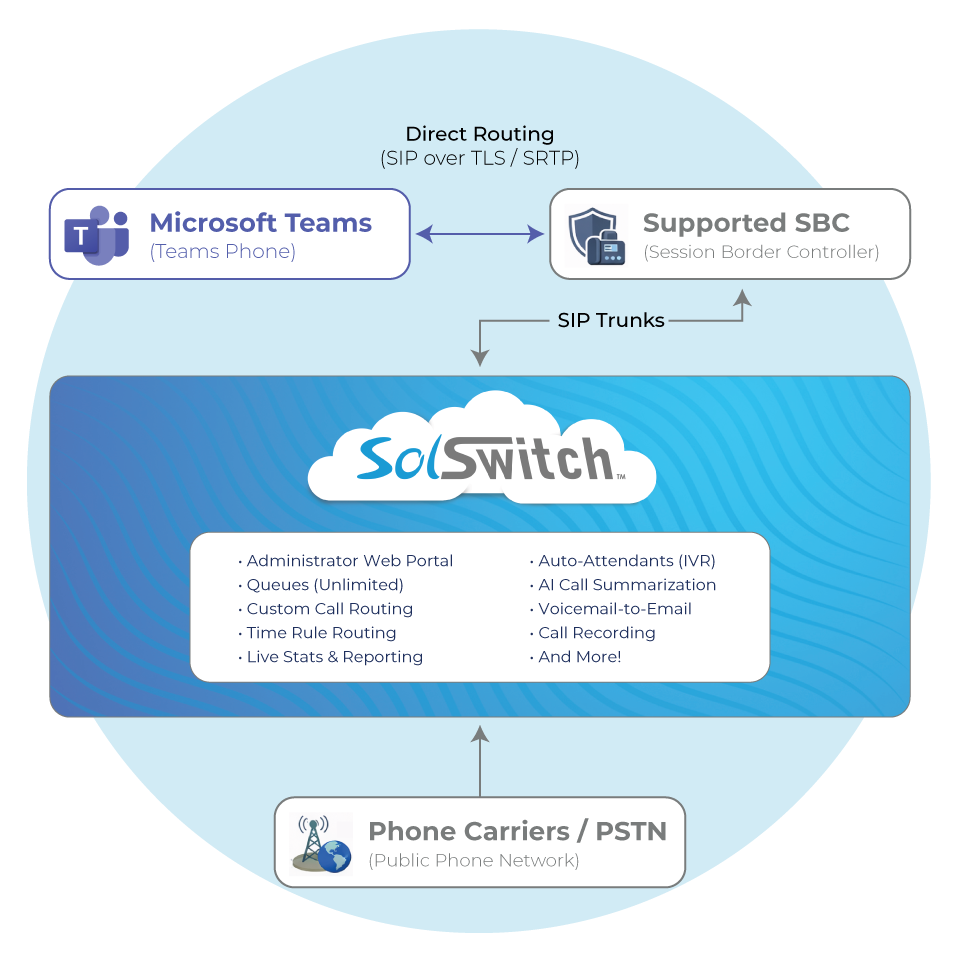
Direct Routing connects Microsoft Teams Phone to PSTN connectivity through a supported Session Border Controller (SBC). SolSwitch is the platform that routes calls, applies your business rules and integrates with your telephony services.
- 1 Users call out from MS Teams on desktop or mobile.
- 2 Calls route via Direct Routing through the SBC / trunk path.
- 3 SolSwitch controls call flow: auto-attendants (IVRs), queues, time rules, voicemail, AI tools, etc.
- 4 Sunwire supports it from design and deployment to testing and ongoing changes.
What Sunwire Handles
- Discovery & design (call flows, queues, auto-attendants, schedules)
- Configuration + validation testing
- Number porting / routing coordination (where applicable)
- User enablement + go-live support
- Ongoing changes and optimization
What You'll Need
- Microsoft Teams Phone licensing for users who will place/receive PSTN calls.
- Direct Routing connectivity (via a supported SBC path).
- Your PSTN plan (numbers/trunks) and desired call flows.
- Implementation window for testing + cutover (we'll help plan it).
Sunwire can also help with all of the above!
Ready to enable Teams calling with SolSwitch?
Tell us your user count and call flow needs - we'll map the best path to go-live.
POWERED BY SOLSWITCH
Bring SolSwitch features into your Teams calling
Teams becomes the dialer. SolSwitch becomes the phone system.
-

Administrator Web Portal
Easily customize and adjust your entire system on the fly with the click of the mouse.
-

Auto-Attendant (IVR)
An IVR allows callers to navigate the phone system using pre-recorded voice prompts and touch-tone or vocal responses.
-

Queues (Unlimited)
Queues are used as a way of handling incoming calls by following infinite rulesets specified by the system's administrator.
-

Reporting and Live Stats
Track every leg of every call, live queues and evaluate important call data insights.
-

Time Rules
Program your system to route incoming calls appropriately, any time, day or night, weekend or holiday.
-

Voicemail-to-Email
Voicemail messages can be delivered by email to one or multiple addresses so that they can be listened to from your inbox or mobile.
Frequently Asked Questions
No. This solution uses Microsoft Teams Phone with Direct Routing. Users call from Teams; SolSwitch powers call routing and PBX features in the background.
Yes. Many organizations keep their existing numbers and extension structure while enabling Teams users to call externally through those numbers and call flows.
Those stay in SolSwitch. You still get business-grade routing rules - while users call from Teams.
Yes. Each user who places or receives external (PSTN) calls needs Microsoft Teams Phone licensing, along with Direct Routing connectivity through a supported SBC path. Sunwire will confirm exactly what you need during discovery.
It depends on users, sites, numbers and call flow complexity. We'll provide a clear plan with testing and a controlled cutover window.
WE'RE EASY TO REACH
Contact Us
Call, text or email below.
Call or Email
Visit Us
850 Barrydowne Road
Sudbury, ON
P3A 3T7